Task assigned
Included as standard
Powerful communications hub - your personal assistant
Rail Intel includes a built-in communications hub that turns conditional rules into action. Alert emails and in-app system notifications fire when competence lapses, medicals approach expiry, incidents are recorded, messages are raised or welfare follow-up is due, without anyone chasing a spreadsheet, email inbox or only seen when you log in to dashboard.
Assessment window closing soon
Route knowledge · Sarah Mitchell · email + in-app
Licence renewal reminder
3 months before expiry · assessing manager
New on-record message
Employee Messaging & Notes · instant alert
Fatality welfare check reminder
7 days before anniversary · welfare contact due
30 CMS email templates
Browse a few of our automated emails Rail Intel sends
Faithful replicas of the emails Rail Intel sends from the communications hub. Categories rotate automatically, or pick a filter and template chip to explore. Sample data only.
Instant alerts
From Rail Intel <notifications@railintel.co.uk>
·
To alex.manager@northernrail.example
Templates in this category
 | Rail Intel Competency Management System BY RAILINTEL.CO.UK |
Hello Jane Smith,
Welcome to Rail Intel! We are delighted to have Example Rail Co on board. You're almost ready to depart on your competence management journey but before being dispatched, please complete your onboarding which is an ultimate suite of tools to define your company.
Your company has been set up and is ready for you to sign in. Use the details below to get started.
Company code
12345
Temporary password
TempPass123
If you experience any issues or need assistance, our dedicated support team is here to help. Simply reply to this email or contact us at support@railvault.com and we will be happy to assist you.
Best regards,
Rail Intel
Thank you for choosing the most advanced rail competency management system available.
The ultimate rail competency management system — designed by a safety-critical rail professional.
| Rail Intel Competency Management System BY RAILINTEL.CO.UK |
Hello Alex Admin,
Example Rail Co has now been activated on Rail Intel and you have been set up as the company administrator for this organisation (your role on record: Head of Competence). This message was initiated when onboarding completed.
Sign in with your work email (alex.admin@example.com), the company code below, and the temporary password. Rail Intel will require you to choose a new password on first sign-in before you continue.
Company code
12345
Temporary password
AbCdEfGh1234jk
Security
This password is for first-time access only. After you sign in you must set a new password. Do not forward this email; delete it once you have signed in and changed your password.
After you set your password
Use Administration in the app to complete or confirm company configuration (competency frameworks, grading scale, standards, and related settings) before operational teams rely on assessments and records.
Nominated during onboarding by Jamie Onboarding. Contact: jamie.onboarding@example.com
Best regards,
Rail Intel
The ultimate rail competency management system — designed by a safety-critical rail professional.
| Rail Intel Competency Management System BY RAILINTEL.CO.UK |
Hello Alex Manager,
You have been added as a team user for Northern Rail Example on Rail Intel (role title: Assessing Manager, access: Manager).
Sign in with your email (alex.manager@northernrail.example), the company code below, and the temporary password. Change your password after first sign-in.
Company code
NR001
Temporary password
TempPass123
Security
This password is for first-time access only. Do not forward this email; delete it once you have signed in and changed your password.
Best regards,
Rail Intel
The ultimate rail competency management system — designed by a safety-critical rail professional.
| Rail Intel Competency Management System BY RAILINTEL.CO.UK |
Hello Jane Smith,
You requested a password reset for your Rail Intel account. Click the link below to set a new password:
If you did not request this, you can ignore this email. The link will expire in 1 hour.
Best regards,
Rail Intel
The ultimate rail competency management system — designed by a safety-critical rail professional.
| Rail Intel Competency Management System BY RAILINTEL.CO.UK |
Hello Alex Manager,
This is a reminder that the assessment window for Route knowledge assessment is now open for Sarah Mitchell as part of their Annual competence cycle cycle.
Window open
1 Sep 2026
Window close
30 Sep 2026
Please sign in to Rail Intel and complete this assessment before the window closes.
Best regards,
Rail Intel
The ultimate rail competency management system — designed by a safety-critical rail professional.
| Rail Intel Competency Management System BY RAILINTEL.CO.UK |
Hello Alex Manager,
This is a reminder that the assessment window for Route knowledge assessment for Sarah Mitchell (Annual competence cycle) is closing in less than 2 weeks.
Window closing on
30 Sep 2026
Please ensure this assessment is completed before the window closes. Any outstanding criteria will need to be addressed during the Summary Rules event.
Best regards,
Rail Intel
The ultimate rail competency management system — designed by a safety-critical rail professional.
| Rail Intel Competency Management System BY RAILINTEL.CO.UK |
Hello Alex Manager,
The continuous competency cycle Annual competence cycle for Sarah Mitchell expires on 15 Oct 2026 (within 14 days).
Checklist before auto-renewal
- Complete in-cab assessment
- Confirm medical certificate on file
An open competence development plan will carry forward on renewal.
Best regards,
Rail Intel
| Rail Intel Competency Management System BY RAILINTEL.CO.UK |
Hello Alex Manager,
The continuous cycle Annual competence cycle for Sarah Mitchell expired on 15 Oct 2026 and cannot auto-renew.
Reasons
- Missed assessment event
- Medical certificate expired
Please close this cycle and assign a new period when ready. Continuous renewal will not proceed until every assessment event is completed (none missed) and a live medical certificate is in place.
Best regards,
Rail Intel
| Rail Intel Competency Management System BY RAILINTEL.CO.UK |
Hello Jamie Driver,
Alex Manager assigned you a new task in Example Rail Co.
Task
Complete route knowledge refresh
Company
Example Rail Co (12345)
Due
15 Aug 2026
From
Alex Manager
Open the Tasks page from the sidebar after signing in.
The ultimate rail competency management system — designed by a safety-critical rail professional.
| Rail Intel Competency Management System BY RAILINTEL.CO.UK |
Hello Jamie Driver,
Alex Manager reopened this task in Example Rail Co. It is open again.
Task
Complete route knowledge refresh
Company
Example Rail Co (12345)
Due
15 Aug 2026
Reopened by
Alex Manager
Open the Tasks page from the sidebar after signing in.
The ultimate rail competency management system — designed by a safety-critical rail professional.
| Rail Intel Competency Management System BY RAILINTEL.CO.UK |
Hello Alex Manager,
Jamie Driver added an update to the task Complete route knowledge refresh at Example Rail Co.
Task
Complete route knowledge refresh
Updated
11 Aug 2026, 14:32
Update from Jamie Driver
Completed section A of the workbook. Remaining sections scheduled for tomorrow.
Open the Tasks page from the sidebar after signing in.
The ultimate rail competency management system — designed by a safety-critical rail professional.
| Rail Intel Competency Management System BY RAILINTEL.CO.UK |
Hello Alex Manager,
This is an advance notice that Jamie Driver is 7 day(s) from the one-year anniversary of a recorded fatality incident (incident date 15 March 2025; anniversary 15 March 2026).
Anniversaries of this nature can be difficult for drivers. The employee may need additional support around this time.
Please check in with the driver and ensure appropriate support is in place.
If you need to review the incident record or employee profile, sign in to Rail Intel.
Example Rail Co
Best regards,
Rail Intel
The ultimate rail competency management system — designed by a safety-critical rail professional.
| Rail Intel Competency Management System BY RAILINTEL.CO.UK |
Hello Alex Manager,
This is a reminder that the train driving licence for Jamie Driver expires on 15 November 2026 (in 75 day(s)).
Licence details
Licence number: TDL-123456
Expiry: 15 November 2026
Please arrange renewal in good time and update the licence details in Rail Intel once the new licence is issued.
Example Rail Co
Best regards,
Rail Intel
The ultimate rail competency management system — designed by a safety-critical rail professional.
| Rail Intel Competency Management System BY RAILINTEL.CO.UK |
Hello Alex Manager,
Urgent: the train driving licence for Jamie Driver expires on 20 September 2026 (in 28 day(s)).
Licence details
Licence number: TDL-123456
Expiry: 20 September 2026
Please prioritise renewal and update the licence details in Rail Intel as soon as the renewed licence is available.
Example Rail Co
Best regards,
Rail Intel
The ultimate rail competency management system — designed by a safety-critical rail professional.
| Rail Intel Competency Management System BY RAILINTEL.CO.UK |
Hello Alex Manager,
The train driving licence for Jamie Driver expired on 1 August 2026 and has not been renewed or updated in Rail Intel.
The driver must be taken off track until a valid licence is recorded.
Licence number: TDL-123456
Expired: 1 August 2026
Please confirm the driver is not operating and update the licence details in Rail Intel once a valid licence is held.
Example Rail Co
Best regards,
Rail Intel
The ultimate rail competency management system — designed by a safety-critical rail professional.
| Rail Intel Competency Management System BY RAILINTEL.CO.UK |
Hello Alex Manager,
This is a reminder that the Task assignment module free trial for Northern Rail Example ends on 30 Sep 2026.
Trial end
30 Sep 2026
If you want to keep task assignment access after the trial, subscribe from the Addons page.
If you have already subscribed or the module was changed by your system administrator, you can ignore this email.
Best regards,
Rail Intel
The ultimate rail competency management system — designed by a safety-critical rail professional.
| Rail Intel Competency Management System BY RAILINTEL.CO.UK |
Hello Jamie Trainee,
Sam Instructor has left feedback for you on the training module Operational Rules as part of your programme at Example Rail Co.
Training module
Operational Rules
Trainer
Sam Instructor
Please sign in to Rail Intel to review the feedback, indicate whether you agree, add any comments of your own, and sign off the module.
If you have any questions, please speak to your driving instructor or training manager.
Best regards,
Example Rail Co Training Team
The ultimate rail competency management system — designed by a safety-critical rail professional.
| Rail Intel Competency Management System BY RAILINTEL.CO.UK |
Hello Sam Instructor,
You have been assigned as the driving instructor for trainee Jamie Trainee at Example Rail Co.
Trainee
Jamie Trainee
Training programme
Train Driver Training Programme
Assigned by
Alex Manager
Please sign in to Rail Intel to review their training record, support their practical driving hours, and leave module feedback when required.
If you have any questions, please speak to your training manager.
Best regards,
Example Rail Co Training Team
The ultimate rail competency management system — designed by a safety-critical rail professional.
| Rail Intel Competency Management System BY RAILINTEL.CO.UK |
Hello Sam Instructor,
You are no longer assigned as the driving instructor for trainee Jamie Trainee at Example Rail Co.
Trainee
Jamie Trainee
Now allocated to
Pat Senior Instructor
Updated by
Alex Manager
Please hand over any important information or concerns about this trainee that may be beneficial for continued safe operation — for example progress notes, route or traction issues, behavioural observations, or outstanding actions — to the newly allocated instructor or the training team.
Best regards,
Example Rail Co Training Team
The ultimate rail competency management system — designed by a safety-critical rail professional.
| Rail Intel Competency Management System BY RAILINTEL.CO.UK |
Hello Alex Manager,
Trainee Jamie Trainee at Example Rail Co currently has no driving instructor allocated.
Unallocated from
15 Aug 2026, 08:55
Previous instructor
Sam Instructor
Cleared by
Alex Manager
As their assessing manager, please check what the trainee was doing during this unallocated period and arrange a driving instructor allocation as soon as practicable.
Best regards,
Example Rail Co Training Team
The ultimate rail competency management system — designed by a safety-critical rail professional.
| Rail Intel Competency Management System BY RAILINTEL.CO.UK |
Hello Jamie Trainee,
This is a friendly reminder that Sam Instructor left feedback for you on Operational Rules at Example Rail Co, and we have not yet received your response.
Your trainer's feedback has been waiting for 7 days. Please review and sign off when you can.
Sign in to Rail Intel to review the feedback, share your own comments, and complete your sign-off.
If you need help accessing your training record, please contact your driving instructor or training manager.
Best regards,
Example Rail Co Training Team
The ultimate rail competency management system — designed by a safety-critical rail professional.
| Rail Intel Competency Management System BY RAILINTEL.CO.UK |
Hello Jane,
There is an update on your Rail Intel support ticket RV-A1B2C3D4 (Unable to upload assessment evidence).
Current status
closed
Update
Your support ticket has been closed.
Review links appear here when a ticket is closed.
Sign in to Rail Intel and open Help & Support to view the full ticket history or reply.
Best regards,
Rail Intel Support
The ultimate rail competency management system — designed by a safety-critical rail professional.
| Rail Intel Competency Management System BY RAILINTEL.CO.UK |
Hello Jamie Trainee,
Welcome aboard! You have been set up as a trainee driver at Example Rail Co and your driver training programme is now live on Rail Intel.
Your training schedule is Train Driver Training Programme. You will progress through your training modules (typically Personal Track Safety, Operational Rules, Traction and Principles of Route Learning), build up your minimum trainee driving hours with your allocated driving instructor, and complete assessments along the way.
Your training programme
Train Driver Training Programme
Driving instructor
Sam Instructor
Throughout your training you will be asked to review and sign off trainer feedback at the end of each module and add any feedback of your own. Please sign in regularly to keep on top of your development.
If you have any questions, please speak to your training manager or driving instructor.
Best regards,
Example Rail Co Training Team
The ultimate rail competency management system — designed by a safety-critical rail professional.
| Rail Intel Competency Management System BY RAILINTEL.CO.UK |
Hello Alex Manager,
Jamie Driver has submitted a Annual leave request that requires your decision.
Request
Annual leave
Dates
2026-08-01 → 2026-08-05
Duration
5 days
Reason / notes
Family holiday
Sign in to Rail Intel and open Leave & Absence to approve or reject this request.
Example Rail Co
The ultimate rail competency management system — designed by a safety-critical rail professional.
| Rail Intel Competency Management System BY RAILINTEL.CO.UK |
Hello Jamie Driver,
Your Annual leave request for 2026-08-01 → 2026-08-05 has been approved by Alex Manager.
Decision
approved
Duration
5 days
Manager notes
Approved — enjoy your break.
Example Rail Co
The ultimate rail competency management system — designed by a safety-critical rail professional.
| Rail Intel Competency Management System BY RAILINTEL.CO.UK |
Hello Jamie Driver,
Your manager has awarded back your Holiday leave for 2026-08-01 → 2026-08-05. These days have been returned to your remaining holiday balance.
Awarded back
5 days
Actioned by
Alex Manager
Notes
Cover no longer required — days returned to balance.
Example Rail Co
The ultimate rail competency management system — designed by a safety-critical rail professional.
| Rail Intel Competency Management System BY RAILINTEL.CO.UK |
Hello Alex Manager,
Jamie Driver has cancelled their Holiday leave request.
Cancelled request
Holiday leave
Dates
2026-08-01 → 2026-08-05
Duration
5 days
Previous status
pending
No further action is required unless you need to update cover arrangements.
Example Rail Co
The ultimate rail competency management system — designed by a safety-critical rail professional.
| Rail Intel Competency Management System BY RAILINTEL.CO.UK |
Hello Alex Manager,
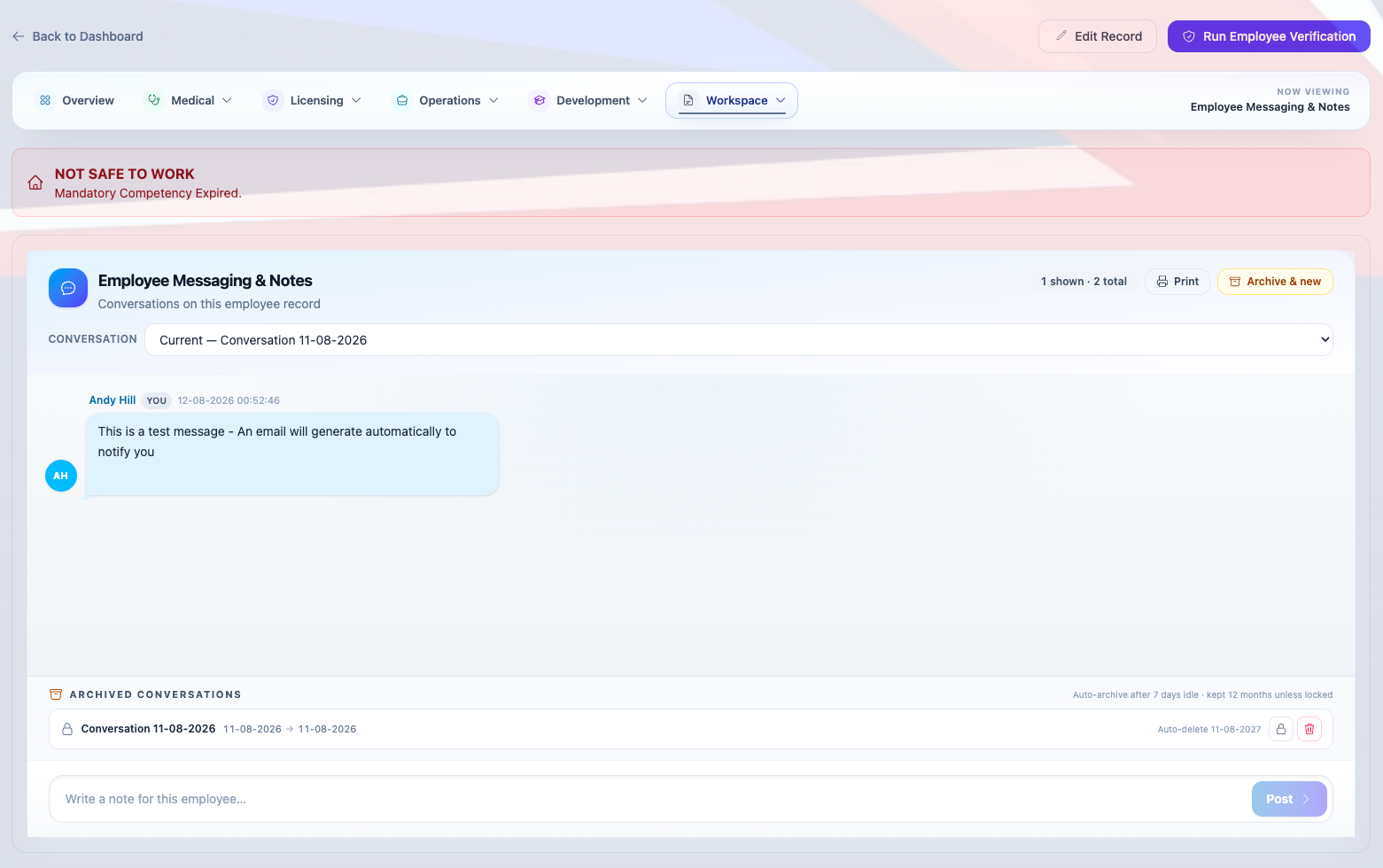
Sam Driver posted a message on Sam Driver's Employee Messaging & Notes.
Message preview
Thanks for the update — I'll complete the assessment this week.
Sign in to Rail Intel and open this employee's Employee Messaging & Notes tab to reply.
Example Rail Co
The ultimate rail competency management system — designed by a safety-critical rail professional.
| Rail Intel Competency Management System BY RAILINTEL.CO.UK |
Hello Jamie Trainee,
A Performance & Support plan has been raised for Jamie Trainee at Example Rail Co and requires your trainee signature.
Plan
Route knowledge support plan
Raised by
Sam Instructor
Reason
Behind on route learning hours
Review date
27 Aug 2026
Please sign in to Rail Intel to review this plan, add any comments, and provide your trainee acknowledgement signature.
Open the trainee's profile, then the Monitoring tab, and complete your signature on this plan.
Best regards,
Example Rail Co Training Team
The ultimate rail competency management system — designed by a safety-critical rail professional.
| Rail Intel Competency Management System BY RAILINTEL.CO.UK |
Hello Jamie Driver,
A digital driving cab pass has been issued to you by Example Rail Co. Your pass is shown below (front and reverse). Keep this email for your records.
Front of pass
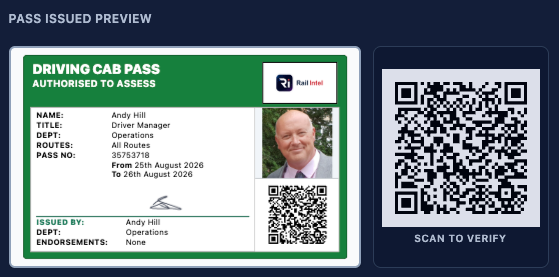
Reverse of pass
You can also open the interactive digital pass online (no sign-in required):
https://example.com/api/public/cab-pass-verify?s=sample
Example Rail Co
The ultimate rail competency management system — designed by a safety-critical rail professional.
Email and system notifications
The same event reaches the inbox and the dashboard
Conditional rules across competency, medicals, licensing, incidents, monitoring and messaging drive both email alerts and in-app system notifications. Managers see items on the dashboard feed; employees see them on their record where permissions allow, nothing depends on an inbox alone.
- Competency and cycle expiry before someone reaches the railway out of date.
- Medical and licence renewal reminders on the dashboard and by email.
- Incident and monitoring follow-up when welfare contact or action is required.
- Tasks, leave, cab passes and messaging with matching in-app alerts.
System notifications
5
Task assigned to you
Complete route knowledge refresh — due 15 Oct 2026
Leave request awaiting decision
Sarah Mitchell — annual leave 1–5 Aug 2026
Assessment window closing soon
Route knowledge for Sarah Mitchell closes 30 Sep 2026
Licence expired — action required
Sarah Mitchell must be taken off track until licence renewed
New on-record message
Sarah Mitchell posted on Employee Messaging & Notes
Scheduled alerts
Time-based rules that run without anyone watching a calendar
Rail Intel's scheduler evaluates competence cycles, licence dates, continuous renewals and welfare milestones daily. When criteria match, the communications hub sends the right template — by email and as a system notification.
Assessment windows
Open and closing reminders for scheduled cycle events — emailed to assessing managers with window dates.
Continuous cycle renewal
14-day approaching notice with checklist, or blocked renewal when events are missed or medicals lapse.
Train driving licence
3-month and 6-week renewal reminders, plus expired licence action when someone must come off track.
Welfare & monitoring
Fatality anniversary support reminder seven days ahead, and trainee feedback chasers after seven days.
On-record messaging
Conversations stay on the employee record, with email alerts
Notes about competence, medicals or incidents remain auditable on the profile, not buried in personal Outlook threads. Each thread belongs to the employee you are discussing, so audits, handovers and investigations can pull the full exchange history from one place instead of hunting through inboxes.
When someone posts a message, the communications hub emails the people who need to see it and keeps the thread in Rail Intel. Read receipts show who opened a note and when, without managers camping in the CMS for a reply. Switch between the current conversation and archived threads for earlier periods, so past context stays available while new notes stay on the active thread.
Locking conversations and retention
When a conversation is locked, that thread closes as read only and keeps its date range on the employee record. Every message and read receipt stays in Rail Intel for audits and investigations, nothing is removed because the discussion moved on. A new current conversation opens for ongoing notes, and people with permission can open archived threads from the conversation picker to review what was said without posting into a closed period.
Maintained by Rail Intel
Automated does not mean generic
Every transactional email is written and maintained by Rail Intel — cab passes, assessments, incidents, leave, tasks and operational events. Company administrators do not author templates in the CMS; Rail Intel owns the timing, the rules and the wording, while your operation controls permissions and who receives each alert.
Templates span scheduled compliance alerts, welcome and account access, cab pass delivery, leave workflows, trainee communications and on-record messaging — updated centrally so messaging stays consistent.
Communications hub
Conditional rule matched
Competency cycle
Assessment window closing soon
Assessment window closes soon for Sarah Mitchell
Assessment window closing soon
Same event · inbox and dashboard · no manual chasing
Rules across competency, medicals, incidents and messaging — delivered on two channels automatically.
Related: Administration, Incidents & Monitoring
Frequently asked questions
What triggers automated communications in Rail Intel?
Conditional rules across competency, medicals, licensing, incidents, monitoring and messaging drive both email alerts and in-app system notifications when configured criteria are met.
Can we control the emails that are sent?
You control which events trigger communications and who receives them through permissions and module configuration. Email template wording is maintained by Rail Intel — companies do not create or override templates in Administration.